
Slots
Play Sweet Bonanza and many more slots directly in your mobile browser.

Play directly in your browser on Android and iPhone. Sign in to your existing account to access casino games, live casino and sports betting on your phone. For quicker access, you can save a Golazzo shortcut to your home screen.
Android and iPhone · Browser access · 18+
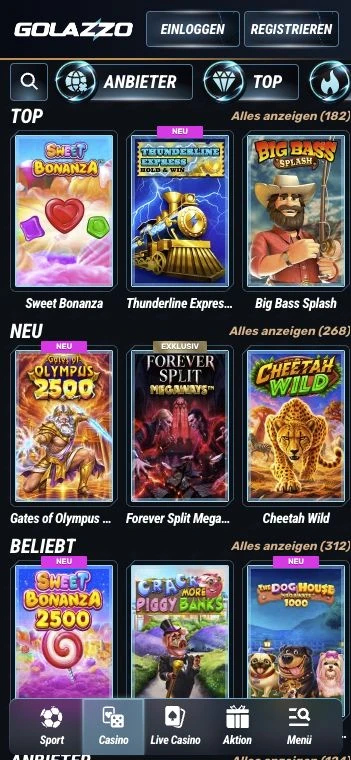

You do not need to download an app to access Golazzo this way. An internet connection is required to play and use your account.
Android · Chrome
In Chrome, you can add a shortcut to your home screen. You can then open Golazzo by tapping its icon without typing the address again.
You do not need to download an APK file.
iPhone · Safari
In Safari, you can add Golazzo to your Home Screen. Use the same login details as on your computer.
If you cannot see the option, you can add it through «Edit Actions» in the Share menu. On iPhone, you will find this at the bottom of the list. You can also open Golazzo directly in Safari without adding an icon.
You play through our mobile website. There is no need for an APK file on Android or an App Store download on iPhone. A home screen icon simply opens the same website.
The shortcut does not replace your login details or the need for an internet connection. You can always play directly in your browser without it.
Use the same email address and password on your phone as on your computer. You do not need a separate account for the casino, live casino or sportsbook.
If your browser fills in an old password after you have changed it, enter your current password instead. You can reset it using «Forgot password?» in the login window. You may need to sign in again after logging out or clearing your browser data.
Our slots, live casino and sportsbook are also available on mobile. Your bonus terms remain the same: signing in on your phone does not change the deposit requirement, deadline or wagering requirement.
Play Sweet Bonanza and many more slots directly in your mobile browser.

Play roulette and blackjack or join live game shows, even on your phone.

Pre-match or live: use your bet slip with your existing account.
If Golazzo is not loading, try refreshing the page or using another up-to-date browser. You need a stable internet connection to play and access your account.
Use your registered email address and current password to sign in. You can reset your password using «Forgot password?» in the login window.
To create a shortcut, open Golazzo directly in Chrome or Safari. The browser window inside another app may have a different menu.
You can contact support through live chat in the casino or at [email protected]. For technical issues, tell us which device and browser you are using and provide the exact error message. Never share your password.
You do not need to download anything from an app store to access Golazzo on mobile. Open Golazzo in your browser. You can also add a shortcut to your home screen if you want.
No. You do not need an APK file to access Golazzo in your browser or add a home screen shortcut. Open Golazzo directly in Chrome or another compatible mobile browser.
Open Golazzo in Chrome and use the three-dot menu to create a shortcut. Once you confirm, the icon appears on your home screen. Tap it to open Golazzo without entering the address again.
In Safari, use the Share menu to add Golazzo to your Home Screen. You can then open Golazzo using the new icon.
No. Sign in using the same email address and password as on your computer. Your account works for casino games, live casino and sports betting.
You need an internet connection to play games, place sports bets and access your account. A home screen shortcut does not make Golazzo available offline.
A shortcut does not replace the login process. You may need to sign in again after logging out or clearing your browser data. Use your registered email address and current password.
If «Add to Home Screen» is missing, go to the bottom of the Safari Share menu and select «Edit Actions» to add it. You can still use Golazzo directly in your browser without a shortcut.
Yes. Logging in on mobile does not change the deposit requirements, deadlines or wagering terms of your promotion. You can find our welcome offer terms on the bonus page.
Your casino and sports betting, directly in your browser or through your Golazzo home screen icon.